
Knowify vs. A-Systems JobView
The biggest difference between Knowify and A-Systems JobView is that Knowify is meant to work alongside Quickbooks. It adds project management and other construction-related features not found in Quickbooks. A-Systems JobView, on the other hand, is a full standalone accounting system. It covers the accounting fundamentals, like accounts payable, accounts receivable, and general ledger. It also adds job costing, payroll, subcontractor management, equipment management, purchase orders, and more.
JobView is built around job costing. It's built for construction contractors looking to manage their expenses. It has many construction-centric features built right in.
Deployment
Knowify is cloud-based. A-Systems JobView can be installed on-premise or hosted in the cloud.
Pricing
Knowify is a subscription model, with monthly payments. A-Systems JobView is a one-time payment if installed on-premise, with the option to add a yearly support/updates subscription. If you opt for the cloud hosting option, there is a monthly fee to host.
Feature Focus
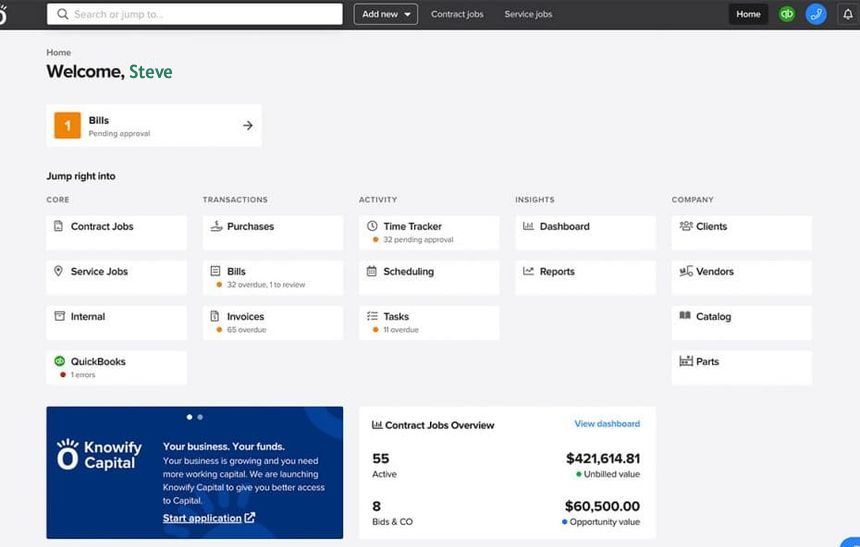
Knowify mainly centers around estimates/proposals, contracts, scheduling, time tracking, field apps, and WIP. Knowify markets itself as the official QuickBooks Online construction software partner. It does a two-way sync of customers, vendors, items, bills, invoices, payments, time, projects, etc. You create a lot of the operational work in Knowify and then push the financial transactions into QuickBooks. Job costing, real-time WIP, project budgets, and several advanced features are not available in the Core plan, but can be purchased in the Advanced tier.
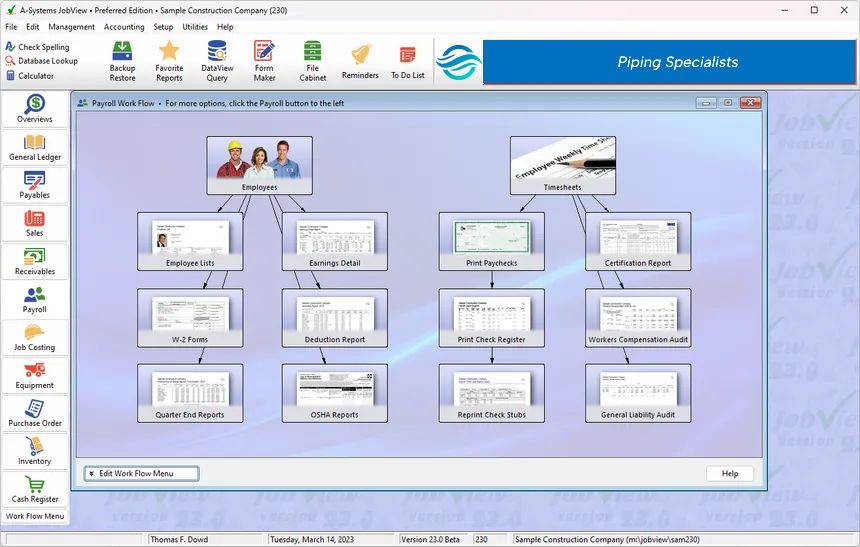
A-Systems JobView focuses on job costing, showing budget vs. actual, cost-to-complete forecasts, granular cost data, and WIP reports. JobView is a complete construction accounting system. The job is the center of attention: You set up a job, import or enter a budget, post costs through normal AP/payroll processes, and get phase-level profitability, cost-to-complete forecasts, and detailed job cost reports without needing a separate accounting package. It includes certified/union/multi-state payroll, progress billing, AIA draw info, retainage, subcontracts, change orders, and optional modules for inventory, purchase orders, and equipment costing.
Time on Market
Knowify has been on the market since 2012. A-Systems has built construction accounting software since 1978, making it a long-established product.
Strengths and trade-offs
Knowify advantages
- Modern cloud + mobile experience for field crews.
- Excellent AIA pay applications and contract workflows aimed at trade contractors (electrical, plumbing, HVAC, etc.)
- If you've purchased the right subscription, real-time visibility and WIP
- Easy multi-user access from anywhere. Recent AI features bidding assistance.
- If you enjoy Quickbooks, you won't need to replace it.
Knowify limitations
- Not accounting software in and of itself. QuickBooks is required for a complete financial picture.
- Higher subscription costs are required for full job costing and advanced project tools.
- Some sync nuances (directionality and what originates where) require careful setup.
JobView advantages
- High user satisfaction in available reviews. Noted for ease of use, reporting, and U.S.-based support.
- True standalone construction accounting with job costing baked in from the start.
- One system for GL + job costs + payroll (including certified/prevailing wage).
- Lower long-term cost for smaller firms that prefer a perpetual license over ongoing SaaS fees.
- Long track record with contractors.
JobView limitations
- Windows desktop-centric (less native mobile/field app experience than modern SaaS).
- Pricing for mid/higher editions is quote-based.
- Feels more traditional; less emphasis on real-time collaborative field tools or dispatch compared with Knowify.
Who Might Prefer Each Option
If you are currently enjoying your experience with Quickbooks, and you don't mind adding a second program to get more construction features, Knowify might be best for you. If you want emphasis on mobile/field tools and are fine with the subscription model, it may be a good fit.
If you want a single, self-contained construction accounting system focused on detailed job costing and payroll, A-Systems JobView fits the bill. If you prefer a one-time (or lower ongoing) cost model, run primarily from the office on Windows, and do not need heavy mobile collaboration feature, you may feel more at home with JobView. Also, if your looking to replace Quickbooks in order to get more construction-centric functionality, this is a great match.